Sunday, February 24, 2013

So What Happened to John McAfee..?


As far as I've heard, he's back in US after long cross-country run, from the police. If you don't know already, he was the suspect (or the "man of interest") of killing his neighbor at one of the islands in Belize, where his luxury home is located. After the neighbor's death, he was on the run in disguise. 

Here's the latest story:


So he has running loose for five weeks throughout central america. Finally he emerged out of Oregon. At this point, he spread a fake news through the net that he was captured in Mexico, and fled to Guatemala. When he was asked why he was fleeing, his response was: "As a 'person of interest', you have to come to there offices -- which are in the mass of the prison complex -- to talk to you. And in Belize, they can detain you for 30 days with no charges what so ever..". When he was asked who killed his neighbor, the response: "I don't know, in Belize murder is happening all the time." And he says that the Belize police was out to get him, because of his open criticism of the Belize police corruption, and the police deliberately killed the man to get to him. 


Also he likes to often speak about his sexual prowess: "People ask me, 'You really slept with 10 17 year girls?' And i'm a 67 years old man, and I say 'Yup, i did'. There's no point in not telling the truth now, no point now in dancing around it."


"John with his current young girl friend, who he intend to get married (December, 2012)"


But unexpectedly, in a press conference at Guatemala, McAfee get's arrested by the police. 


But even that did not took too long. McAfee faked a heart attack and was hospitalized. After he was released from the hospital, he was deported to US. And he came to Portland.


And now, the news of the murder is all covered up by the talks about his various exploits...


Monday, December 3, 2012

GeoSoft Update:

We received a outsourcing project for SLT, which consists of 6 modules:

* Interview
* Training
* Event Calender
* Inventory Control
* Procurement procedure
* Welfare

Hard work ahead! O.o :-)


Wednesday, October 31, 2012

GeoSoft Update


GeoSoft Update:


We are in the process of completing the POS system and the Inventory Control system requested by "Sisira Motors" (Dambulla branch). We are currently schedule for the 2nd system assessment with the client on next Tuesday.


Friday, October 26, 2012

Our Software page for computer programming students


GeoSoft Update:

GeoSoft Update:

The Inventory Control Software project we've undertaken for Darshana Engineers Pvt Ltd. has completed and installed on Client's location (Darshana Eng branch, Wehara, Kurunegala) about a month ago. The system's Beta testing period is yet ongoing. And we are providing continuous customer care online.


Friday, October 12, 2012

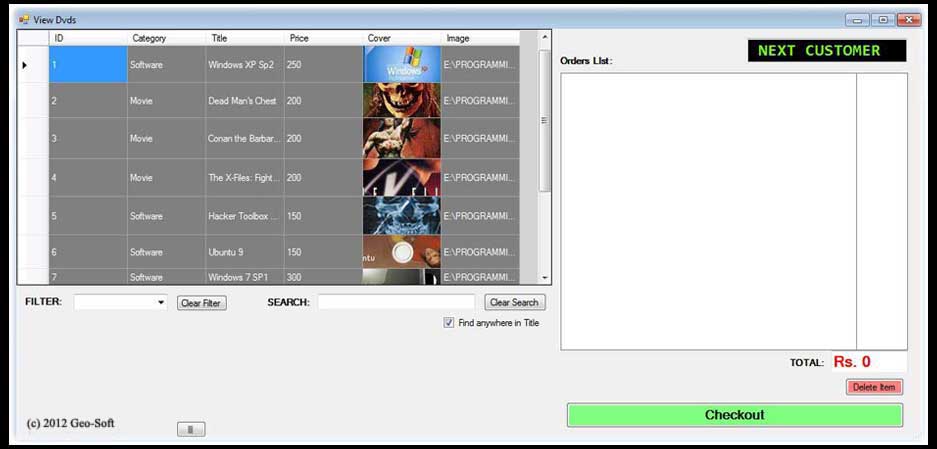
Movies Library for Movies Rental Shop (MS Windows) v1.0 (c) 2012 Kasun Liyanage

Movies Library for Movies Rental Shop (MS Windows) v1.0
(c) 2012 Kasun Liyanage


Download, Extract, and Run "DVDShopNonEDM.exe". Enjoy!

Note: You need .NET framework installed to run it

DOWNLOAD


Tuesday, October 2, 2012

C#: How to upload files using FTP to a remote server and the localhost


Uploading files to localhost


1. Make your computer a FTP server.

  • i use XAMPP to do this.


                    OR    


  • In the Xampp control panel, click the check boxes before Apache, MySql, FileZilla and click on the 3 start buttons.
  • Make sure to click "Install" when asked, when you click on the checkbox before FileZilla.
  • Now click on the "Admin" button next to "Stop" button of FileZilla. That will open FileZilla Server control panel.

  • Select Edit > Users to create a new user.
  • Click the "Add" button under "users" and Type a user name and click OK.

  • Type a password in Password field.
  • Then click on "Shared Folders" in "Page" box.
  • Click "Add" button to add the home directory to use as the location to upload files.

  • Select the added path  and click the "Set as home dir" button to make it your home directory.
  • Check all the check boxes Read, Write, Delete etc next to folders list box.

  • Click OK of the Users dialog box and close it.
  • Ok now you have a FTP server with a username and a pass.


2. Write the C# code.


  • Below is the C# code to upload a test.text file as "voot.txt", to the localhost directory. When the code is executed, the "test.txt" file be copied into the localhost home directory as "voot.txt".


            // Get the object used to communicate with the server.
            //<FOR LOCALHOST>
            FtpWebRequest request = (FtpWebRequest)WebRequest.Create("ftp://localhost/voot.txt");
            
            request.Method = WebRequestMethods.Ftp.UploadFile;

            // This example assumes the FTP site uses anonymous logon.

            //<FOR LOCALHOST>
            request.Credentials = new NetworkCredential("kasun", "mypass");

            // Copy the contents of the file to the request stream.
            StreamReader sourceStream = new StreamReader("test.txt");
            byte[] fileContents = Encoding.UTF8.GetBytes(sourceStream.ReadToEnd());
            sourceStream.Close();
            request.ContentLength = fileContents.Length;

            Stream requestStream = request.GetRequestStream();
            requestStream.Write(fileContents, 0, fileContents.Length);
            requestStream.Close();

            FtpWebResponse response = (FtpWebResponse)request.GetResponse();

            response.Close();


Uploading files to a Remote-Host


1. Register for a free/non-free web host with FTP. 


  • i have used free hosting site "worlditsme.com" for testing.
  • Get your Host (ftp) address, username, password from the site after registering.
  • Example Host (ftp) address: ftp://yourname.worlditsme.com/
  • User name and password will be the ones that you've used to register the worlditsme.com site.

2. Write the C# code.


Below code will upload "test.txt" file as "voot.txt" to the remote hosts, home folder.

            // Get the object used to communicate with the server.

            //<FOR REMOTE HOST>
            //FtpWebRequest request = (FtpWebRequest)WebRequest.Create("ftp://myusername.worlditsme.com/voo.txt");
            
            request.Method = WebRequestMethods.Ftp.UploadFile;

            // This example assumes the FTP site uses anonymous logon.

            //<FOR REMOTE-HOST>
            //request.Credentials = new NetworkCredential("kasunl", "mypass");

            // Copy the contents of the file to the request stream.
            StreamReader sourceStream = new StreamReader("test.txt");
            byte[] fileContents = Encoding.UTF8.GetBytes(sourceStream.ReadToEnd());
            sourceStream.Close();
            request.ContentLength = fileContents.Length;

            Stream requestStream = request.GetRequestStream();
            requestStream.Write(fileContents, 0, fileContents.Length);
            requestStream.Close();

            FtpWebResponse response = (FtpWebResponse)request.GetResponse();

            response.Close();

To check whether the file is uploaded, use a client like FileZilla, or the site's home directory by login in with your ftp host address (insert it into your browser and enter your username and pass when prompted.


That's it.

My Facebook Music group

  🎧𝅘𝅥𝅲 M̾U̾S̾I̾X̾ ♭🎧